Panasonic KX-TDA600. Параметры соединения и формат данных SMDR/CDR
Данные ниже соответствуют только программе Advanced PBX Data Logger и могут быть не применимы для других программных продуктов.
| Parameter |
Default value |
| Baud rate |
9600 |
| Data bits |
8 |
| Parity |
none |
| Stop bits |
1 |
| Flow control |
Hardware |
Default programming code for panasonic is 1234 or 0000 or 9999.
KX-TDA Series : KX-TDA30 KX-TDA50 KX-TDA100 KX-TDA200
Note: Our data logger cannot capture SMDR data through a USB port.
Open the KX-TDA Maintenance Console and go to:
Maintenance > SMDR
SMDR Type: TYPE C
Outgoing Call Print: Print
Incoming Call Print: Print
Intercom Call Print: Print
Log-in/Log-out Print: Print
ARS Dial (Automatic Route Selection): Dial after ARS Modification
CallerID Print format: Name + Number
DDI/DID Print format: Name + Number
Secret Dial: Print dialled number
Privacy mode: Print Dialled Number
Date Format: YY-MM-DD - named as international format
Maintenance > Miscellaneous
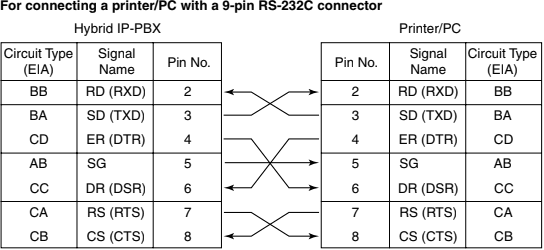
RS-232C: Baud Rate: 19200
RS-232C: NL Code: CR+LF
RS-232C: Word Length: 8bit
RS-232C: Parity Bit: None
Error Log Information Print: Print
System > Date & Time
Change the date and time to current ones.
KX-TD and KX-TA Series (newer)
Go to the main console (Extension 101) and put it to programming mode by moving the switch on the phone to programming position.
Press *#xxxx where xxxx if the password for programming. This is usually 1234 or 0000 or 9999. If you don't know the password then please contact the supplier.
[800] - RS-232C Communication Parameters: CR+LF, 9600, 8 bits, mark parity, 1 stop bit.
[801] - choose 0 (skip perforation)
[802] - incoming on and outgoing on
[803] - choose to print the speed dialing
[805] - choose account code report to be code or index.
[806] - choose English language reporting
move the programming switch to the original position
KX-TD and KX-TA Series (older ones)
The programming switch is located on the PBX unit - open the cover and you'll find it and move it to programming mode.
[23] - Duration time count star mode: instantly (can be configured in the software)
[24] - SMDR Communication Parameters: CR+LF, 1200 bps, 7 bits, mark parity, 1 stop bit, 66 lines per page, skip perforation 0.
[26] - Outgoing: ON, Incoming: ON
move the programming switch to the original position
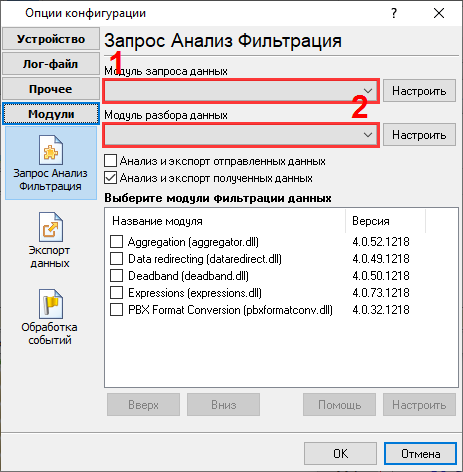
Выбор правильного модуля-парсера для Panasonic KX-TDA600
Данные, извлекаемые PBX Data Logger
| Описание | Тип данных | Имя колонки |
|---|
| Время звонка | datetime | CALL_TIME |
| Расширение | string | EXT |
| CO | string | TRUNK |
| Направление | string | DIRECTION |
| Тип звонка | string | CALL_TYPE |
| Вызывающий телефон | string | CALLER_PHONE |
| Caller name | string | DIALED_PHONE |
| DID name | string | DNIS |
| Ожидания ответа | datetime | RING |
| Длительность звонка | datetime | CALL_DURATION |
| Длительность звонка (с) | integer | CALL_DURATION_S |
| Абонент | string | ACC |
| CD | string | FLAG1 |
Интересуют отчеты об использовании АТС?
Мы предлагаем утилиту PBX Reports с разнообразными ручными и автоматизированными отчетами, с возможностью вывода на печать, в файлы Excel или PDF, или отправкой по электронной почте, встроенный веб-сервер, и другие возможности. Смотрите тут
Нужна история звонков в базе данных?
Это стандартная функция нашего логгер, который получает и экспортирует данные SMDR или CDR в реальном времени в вашу базу данных. Проследуйте по ссылке
Замечание: Продукты и компании, указанные здесь используются только для обозначение и идентификации и могут быть торговыми и/или зарегистрированными марками соответствующих компаний.