Nitsuko DX2E-32i. Параметры соединения и формат данных SMDR/CDR
SMDR programming commands
CMD0422: 35-01-03 - SMDR Header Language - English COM port setup
10-21-02 NTCPU Hardware Setup: COM Port Baudrate - 19200 LAN setup
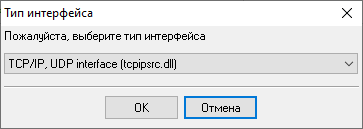
CMD0151-1: 10-20 LAN setup for External Equipment (for SMDR) Настройка логгера в режиме TCP клиентаНаша программа должна работать в режиме TCP клиента. Это означает, что логгер сам инициирует подключение с АТС, которая работает в режиме сервера. Добавьте один или несколько IP адресов вашей АТС ((none)). Номер порта должен соответствовать номеру порта, установленному в настройках АТС или производителем (в этом примере - 5555). 1. Добавьте новую конфигурацию с источником данных типа TCP, если не сделали это ранее.
2. Настройте параметры TCP подключения как показано ниже. 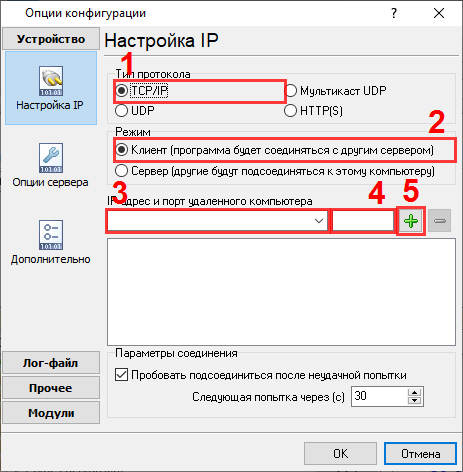
192.168.1.220 5555 192.168.1.220:5555 Выбор правильного модуля-парсера для Nitsuko DX2E-32i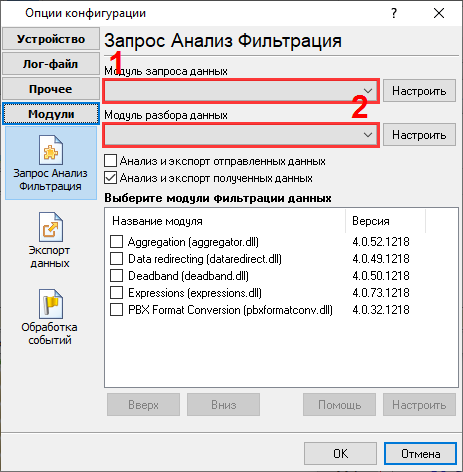
Nitsuko DX2E-32i Nitsuko DX2E-32i Данные, извлекаемые PBX Data Logger
Интересуют отчеты об использовании АТС?Мы предлагаем утилиту PBX Reports с разнообразными ручными и автоматизированными отчетами, с возможностью вывода на печать, в файлы Excel или PDF, или отправкой по электронной почте, встроенный веб-сервер, и другие возможности. Смотрите тут Нужна история звонков в базе данных?Это стандартная функция нашего логгер, который получает и экспортирует данные SMDR или CDR в реальном времени в вашу базу данных. Проследуйте по ссылке Замечание: Продукты и компании, указанные здесь используются только для обозначение и идентификации и могут быть торговыми и/или зарегистрированными марками соответствующих компаний. |
|||||||||||||||||||||||||||||||||||||
|
Copyright © 1999-2024, AGG Software. All rights reserved. Условия использования | Конфиденциальность |